 stm32-st7789-gfx
Testing
Embedded graphics code is slow to debug on a board. This project moves almost all of the checking to a PC, then gives you patterns to confirm the wiring, and finally a short integration checklist.
Three levels
1. On the PC
A model of the ST7789 receives the exact bus writes the library produces. Tests check pixels, window violations and cost. No hardware needed.
2. On the board
Nine test patterns make wiring and configuration faults obvious: swapped colours, mirroring, offsets, noise.
3. Integration
Your port, your init sequence and your UI together: timing, the demo loop, and a pixel comparison with the PC.
Level 1: tests on the PC
The model in tests/host/sim.c implements CASET, RASET and RAMWR as the datasheet describes them. It keeps a 240 x 320 frame memory, advances the write position inside the window, and counts every command and data write. Any pixel sent outside the window or the memory is counted as a violation, and the tests require zero.
make testOne command runs everything below. It needs make, a C compiler and Python 3. Clang, the Arm cross-compiler and Pillow are optional locally; CI runs them all.
| Step | What it checks |
|---|---|
header-check | The committed single_header/lcd_gfx.h matches what the generator produces from the sources. |
host | 56 library checks (geometry, clipping, text, images, widgets) plus 13 self-test checks, on the multi-file build. |
single | The same 69 checks on the single-header build, linked from two translation units so duplicate symbols would show up. |
equiv | Pixel equivalence: for each of the 16 demo and self-test pages, an FNV-1a hash of the 240 x 240 frame must be identical in the multi-file build, the single-header build and tests/golden/pages.golden. |
bench | Bus writes per primitive against pixel by pixel; fails if any multi-pixel primitive costs as much. |
strict | -std=c99 -Wall -Wextra -pedantic -Werror with gcc over the library, the single header and the tests. |
clang | The same with clang. Skipped, with a message, when clang is not installed. |
arm | Cross-compile for Cortex-M7 with arm-none-eabi-gcc -mcpu=cortex-m7 -mthumb -Os and print the object sizes. Skipped when the compiler is missing. |
site | Links, anchors, titles, descriptions, canonical URLs, JSON-LD and the social image of this website. |
Golden pixel hashes
Every page is drawn on a cleared frame memory and hashed with 64-bit FNV-1a over the visible 240 x 240 pixels, row by row, each pixel as two bytes with the high byte first, so the value does not depend on the host's byte order. The file stores one line per page: set, index, name, hash and the number of bus writes.
demo 3 "Panel" 00c8ebdc6ce4bd2e 157844
selftest 6 "Solid red" 87249f08992f2325 57611
A refactor that changes a single pixel changes a hash, and the test fails. When you change what a page draws on purpose, regenerate the file with make golden and explain the reason in the pull request.
Benchmark
make bench measures bus writes on the model. A pixel-by-pixel driver sends 12 writes per pixel, so the comparison column is the number of pixels painted times 12.
| Primitive | Pixels | Bus writes | Pixel by pixel | Ratio |
|---|---|---|---|---|
| One pixel | 1 | 12 | 12 | 1.0x |
| Horizontal line, 200 px | 200 | 211 | 2,400 | 11.4x |
| Diagonal line, 220 x 80 | 221 | 1,112 | 2,652 | 2.4x |
| Filled rectangle, 100 x 60 | 6,000 | 6,011 | 72,000 | 12.0x |
| Filled circle, radius 60 | 11,513 | 12,844 | 138,156 | 10.8x |
| Arc, radius 80, 270 degrees | 4,847 | 7,355 | 58,164 | 7.9x |
| Text, 12 characters, 16 px font | 1,786 | 1,918 | 21,432 | 11.2x |
| Icon, 32 x 32 | 1,024 | 1,035 | 12,288 | 11.9x |
| Image, 120 x 80 | 9,600 | 9,611 | 115,200 | 12.0x |
| Full screen | 57,600 | 57,611 | 691,200 | 12.0x |
| Dashboard demo page | 145,645 | 157,844 | 1,747,740 | 11.1x |
The pixel counts include overdraw, because the library writes every pixel it paints, so the dashboard page paints more pixels than the screen holds.
Continuous integration
The GitHub Actions workflow runs make test with gcc and with clang, installs the Arm cross-compiler so the Cortex-M7 build really runs, uploads the rendered screenshots as an artifact, and publishes this site from the docs/ folder to GitHub Pages.
Level 2: test patterns on the board
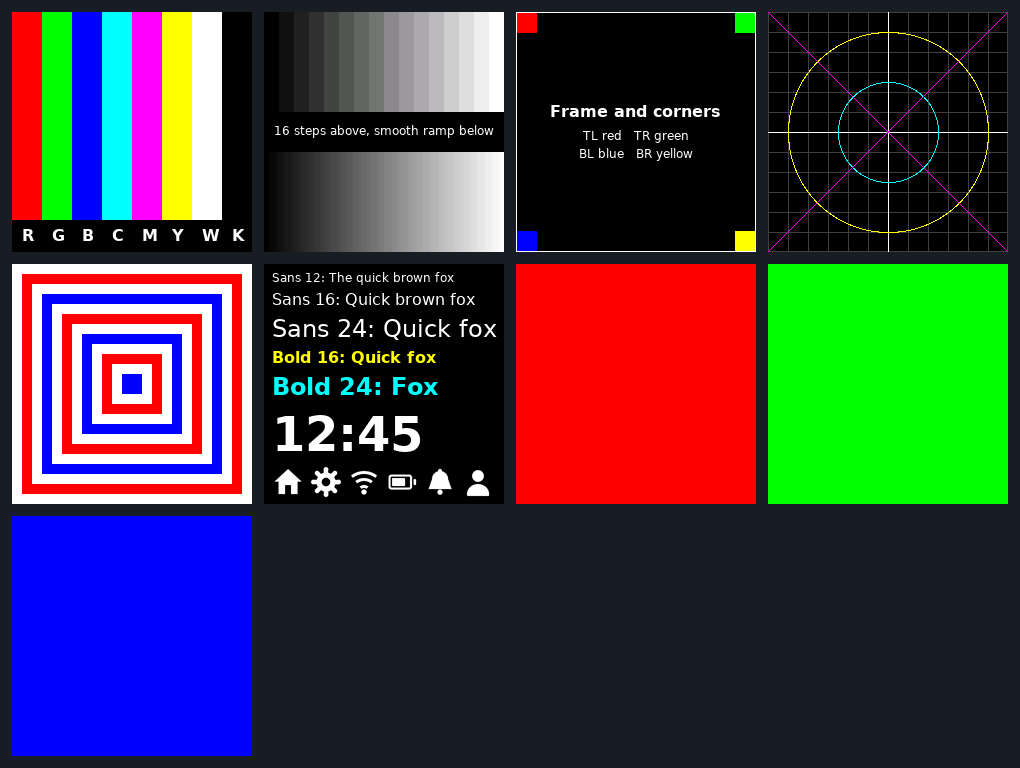
Call gfx_selftest_page(n) for each page and compare what you see with the expectation below.
| Page | Pattern | What you should see | If it is wrong |
|---|---|---|---|
| 0 | Colour bars | Eight bars in the order red, green, blue, cyan, magenta, yellow, white, black, with the letters under them. | Red and blue swapped: BGR bit or byte order. |
| 1 | Gray ramp | Sixteen clean steps above, a smooth ramp below, no tint. | Banding or colour cast: pixel format or missing data bits. |
| 2 | Frame and corners | A white frame touching all four edges; red top-left, green top-right, blue bottom-left, yellow bottom-right. | Mirrored corners: MADCTL. Missing edge or a shift: window offset. |
| 3 | Grid, cross, circle | A square 20 px grid, a centred cross, round circles and two diagonals corner to corner. | Ellipses or skew: wrong window or resolution. |
| 4 | Nested rectangles | Twelve concentric frames, 10 px apart, white, red, white, blue. | Uneven margins: wrong window size; wrapped lines: bad window end. |
| 5 | Text and icons | Every font readable and unmirrored, six icons at the bottom. | Mirrored text: MADCTL. Question marks: source not UTF-8. |
| 6, 7, 8 | Solid red, green, blue | One perfectly flat colour each. | Speckles or stuck bits: timing or a bad data line. |
The troubleshooting table lists the causes and fixes. The patterns are also part of the PC tests, so you can compare your panel with the rendered reference sheet.
Level 3: integration
- Run the demo loop from Draw the first screen and compare each page with the screenshots on the home page.
- Time a full-screen fill. Toggle a GPIO around
gfx_fill_screen()and measure it. The result is dominated by 57,600 calls togfx_port_data(), so it tells you directly how fast your port and your FMC timings are. - Render your own screens on the PC. Link your UI code against the library and
tests/host/sim.cand hash it the waypages.cdoes. A UI change then shows up in review as a hash change. - Check the cost of your redraws. Count writes with the model before you look at the board: a screen that redraws widgets every frame is easy to spot in the numbers.
- Wire in input. Widgets are stateless drawing functions, so connect touch or buttons in your own code and call the widget again with the new value.